
|
|
Articles
Winamp Skins: Make Winamp and Winamp Skins Transparent with Actual Transparent Window
- Introduction
- Make Winamp Transparent
- Conclusion
- Actual Transparent Window Useful Links
- Winamp Useful Links
Introduction
Winamp (Windows Advanced Media Player) media player is probably the best and most popular of the many media players you can find out there. Winamp is the leading high fidelity music player for Windows� that plays MP3s, MP2s, WAVs, VOCs and MIDIs and many other audio formats. It also supports attractive skins and handy plugins. It is clear why Winamp is so popular.
However if you are constanly listen music in Winamp and work with other windows at the same time you may find it useful to apply the transparency effect to your favorite media player to spice up Winamp user interface! Check out our Actual Transparent Window that will help you in solving this task.
Make Winamp Transparent
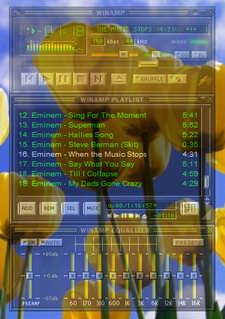
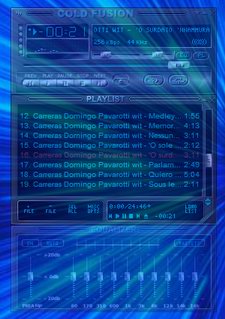
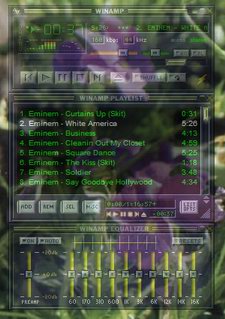
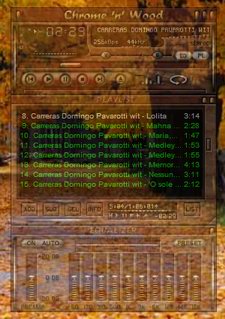
Actual Transparent Window will make Winamp even handier and more appealing than it already is. It will create a transparency effect for Winamp player in Windows 2000/XP/2003/Vista/7/8/10, ranging fr om 0% (opaque) to 100% (invisible). And you can make semi-transparent the basic Winamp skin or other optional Winamp skins!
|
|
The transparency effect cannot be applied to some skins and to displaying video. Actual Transparent Window uses the transparency effect available in standard drawing mechanisms Windows provides for general windows, whereas skinned Winamp and video players use other specific mechanisms (usually DirectX functions). Therefore such windows are not 'general' in their nature, and that's why the standard transparency effect is incompatible with such windows and produces unexpected results when being applied.
You can use Actual Transparent Window to view an application window beneath Winamp by applying transparency effect. This will help you by immediately showing you what windows are open and where they are. The transparency effect also makes for a unique and very attractive appearing desktop.
|
|
With Actual Transparent Window you can give each window in Winamp a greater or smaller transparency effect! For example, you can set the transparency rate to be more or less opaque in play list, equalizer, or the main Winamp window!
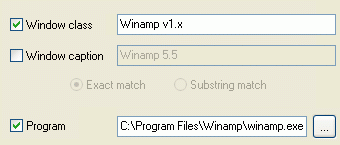
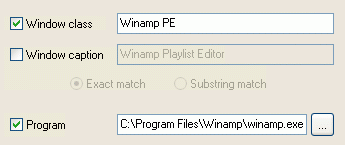
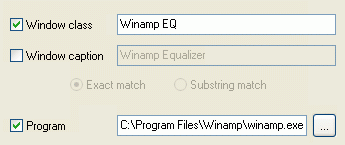
All you need is to create specific settings to the required Winamp window, defining the following properties in the Target Window Pane:
- For the main Winamp window:
- For the Playlist window:
- For the Equalizer window:
Actual Transparent Window can offer you many ways, both automatic and manual, to use the transparency effect:
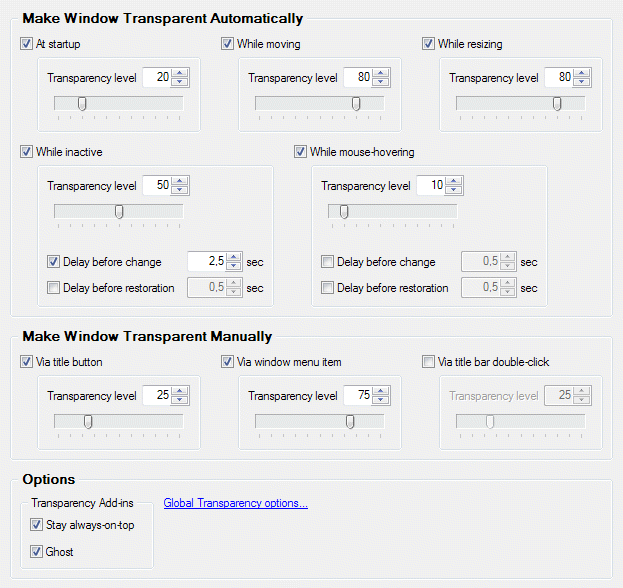
- Make Winamp Transparent Automatically
Actual Transparent Window lets you set individual transparency rates automatically for different Winamp windows states:- set the initial transparency to Winamp at its startup
- change transparency to another value upon Winamp deactivation and restore the previous value when it is activated again.
- temporarily change the transparency to specified value while a Winamp window is being moved, resized or while mouse pointer hovers over it
- Make Winamp Transparent Manually
Also Actual Transparent Window provides some manual methods of choosing the desired transparency for a particular window:- you can make Winamp semi-transparent via special button in the title bar
- you can sel ect a desired transparency rate fr om a system menu, available at right-clicking Winamp taskbar entry
- you can toggle the transparency via title bar's double click
- Transparency Options
And there are some transparency-related options you may find useful. They are called add-ins which means that those options are applied automatically whenever Winamp becomes transparent:- Stay always-on-top - Winamp won't be covered by other windows even when it becomes inactive
- Ghost - in this case all mouse clicks directed at the transparent Winamp window will bypass that window completely while still remaining subject to keyboard actions like hotkeys
So, it is very easy to switch the transparency effect on, and this feature is very handy.
Back to TopConclusion
Actual Transparent Window is a terrific add-on accessory for Winamp, it makes it even more pleasurable and user-friendly! But it doesn't stop with Winamp.
Actual Transparent Window lets you add its handy and attractive transparency effect to any window, for example Windows Taskbar, any Instant Messenger, Start menu and nearly all applications!
Interested? Try it out, Actual Transparent Windowis easy-to-use and very handy!
Actual Transparent Window Useful Links
See the following links that will be your guides in getting acquainted with Actual Transparent Window:
- Actual Transparent Window Home - the official page wh ere you can download or order the risk-free version and read what other users say about Actual Transparent Window.
- Here you can find the information on how to create specific settings for Winamp or any other window.
Winamp Player Useful Links
- Winamp Home - Winamp official site. Download latest version, skins, plugins and component directory.
- Winamp 5.x official site - Winamp 5.x official site. Download latest 5.5 version, find skins and plugins for Winamp 5.x.
- Alternative Winamp 5.x download page
- 1001 Winamp skins - One of the best Winamp skins directory. There are a lot of skins categories: anime, cool, celebrity, hi-fi, games and many others.
- Winamp forums - More than 85000 registered members. More than 85000 threads. More than 600000 posts.
Check out our articles. There you will find many other examples of applying transparency effect, new title buttons and other features that will surely make your life easier!





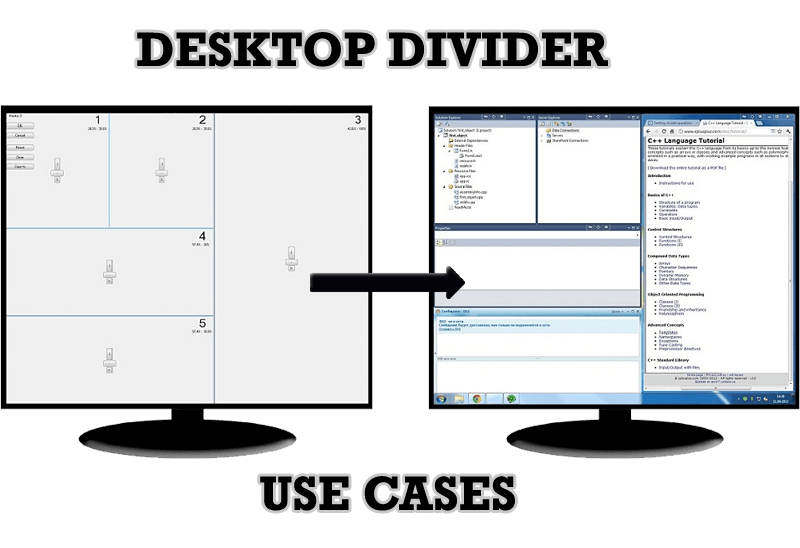
Desktop Divider: Use Cases
Desktop Divider is the new feature of Actual Window Manager and Actual Multiple Monitors. Here you can find some interesting examples of when this feature can be really useful.

8 ways to minimize any program to tray!
Minimizing programs to system tray lets you save space in the taskbar while providing easy access to running applications (via the tray icon). The Minimize Alternatively option can be useful for email clients, text editors and so on.

Easy Way to Minimize Windows to the System Tray or to the Desktop
Actual Window Manager provides an additional title button to minimize any window to the system tray in one click.
Desired Software for the Mouse on Multi-Monitor PC
Actual Multiple Monitors offers many useful features for the mouse on multiple monitors PC.
-
New ways to work with Windows Media Player
Do you like to use Windows Media Player for listening to music and watching video? Great! Actual Title Buttons offers helpful new ways to make your use of Windows Media Player easier and more fun!
-
Find the best way to minimize Outlook Express to the icon in tray
Just one click on Minimize To Tray title button and Outlook Express is minimized to the system tray. Just another click on tray icon and Outlook Express is restored and is ready to use again!
How to Creare a Desktop Profile for Multiple Monitor Desktop
Learn how to create a desktop profile for multiple monitor desktop for quick switching between settings.
-
Actual Window Manager and transparent spreadsheets
Actual Window Manager can be used to solve many problems and is really multifunctional, but recently we have received a letter from one of our users with the certain problem. So, here it is: working with Microsoft Excel worksheets he wants to put an image under the spreadsheet list and make a picture of the screen.

Auto-text functionality in Actual Window Manager
Performing routine actions is much easier now. Actual Window Manager provides the Clipboard Templates feature.
-
Improve MSN/Windows Messenger with Actual Title Buttons
New title buttons can help you vastly improve your work with MSN/Windows Messenger! Using Actual Title Buttons you will be able to add new Minimize Alternatively, Stay Always-on-Top, Make Transparent, Roll Up and other title buttons to MSN/Windows Messenger windows .
