
|
|
Hotkeys
The Hotkeys trigger allows a quick "keyboard shortcut" access to the most popular actions and some service operations. Using the hotkeys is the standard alternative way of control the programs in addition to using the mouse, and this way of control is the most preferred by IT professionals and advanced users.
All hotkeys provided by Actual Tools programs can be divided into the following categories:
hotkeys assigned to certain title buttons and/or window menu items
hotkey groups based on the numpad numeric keys 1..9
hotkeys for standard window operations available in Windows
hotkeys for service operations of the Control Center
hotkeys related to the Virtual Desktops facility
hotkeys related to the Window Snapping facility
hotkeys related to the Desktop Divider facility
hotkeys related to the File Folders extensions
hotkeys related to the Clipboard extensions
hotkeys for various system commands
custom hotkeys for customizable window actions
Please note that all key combinations mentioned here can be customized to reflect better your habits and preferences.
Title Buttons / Window Menu Hotkeys
The following key combinations are provided by default to invoke the action of a certain title button/window menu item:
<Win+A> - to trigger the Align action
<Win+.> - to trigger the AltMin action
<Win+G> - to trigger the Ghost action
<Win+Y> - to trigger the Make Transparent action
<Win+Num*> - to maximize a window to entire multi-monitor desktop (the second press restores window back)
<Win+/>, <Win+Shift+/> - to trigger the Move to Monitor action (move to next/previous monitor, respectively)
<Win+F5> - to trigger the Reapply settings action
<Win+Z> - to trigger the Resize action
<Win+,> - to trigger the Roll Up action
<Win+O> - to trigger the Send to Bottom action
<Win+S> - to trigger the Stay Always-On-Top action
<Win+Ctrl+M> - to start/stop window mirror
If the invoked action has customizable parameters then their actual values will be taken from the corresponding title button settings.
Numpad Hotkey Groups
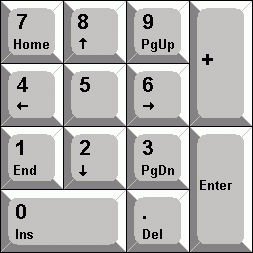
Figure 1. Numeric keypad (numpad)
The physical layout of keys 1..9 of the numpad (numeric keypad) naturally fits as the 9 pre-defined positions of the Align action (<Num7> corresponds to top-left, <Num8> corresponds to top-center, and so on) as the 8 available directions of the Stretch action (<Num7> corresponds to top-left window corner, <Num8> corresponds to top window edge etc.). Because of this there are two hotkey groups available by default for a quick window alignment/stretching:
<Win+Num1>..<Win+Num9> - to quickly align a window to 9 pre-defined positions;
<Win+Ctrl+Num1>..<Win+Ctrl+Num9> (except for <Num5>) - to quickly stretch a window in 8 pre-defined directions (the second press of the same hotkey will restore window's size in that direction).
Hotkeys for Standard Window Operations
There are some window operations Windows provides for almost each window, such as "Minimize". However, there are no standard hotkeys assigned to these operations so that they cannot be quickly invoked from the keyboard. But these operations are so essential and used so often that Actual Tools decide to fill up this gap - currently the hotkeys are available by default for the following standard window operations:
<Win+Down> - for the "Minimize" operation
<Win+Up> - for the "Maximize/Restore" operation (this hotkey toggles the "maximized" window state)
Hotkeys for Control Center Service Operations
The Control Center provides the following special hotkeys by default:
<Ctrl+Alt+Num-> - suspends/resumes the Control Center
<Win+C> - runs the Configuration Module
<Win+H> - invokes the Unhide popup menu
<Win+W> - invokes the Desktop profiles popup menu
<Ctrl+Alt+F12>/<Shift+Ctrl+Alt+F12> - disables/enables all secondary monitors
<Win+Q> - invokes the Quick Window Settings dialog for a window which is active at the moment
<Ctrl+Shift+S>/<Ctrl+Shift+R> - saves/restores the order of desktop icons
<Ctrl+Alt+Shift+L> - toggles the locking of the mouse pointer within the currently active window
<Ctrl+Alt+Shift+I> - forces the currently active window to ignore the losing of the input focus
<Win+`>/<Win+Shift+`> - switches the mouse pointer to the next/previous monitor
<Ctrl+Alt+P> - places the mouse pointer to the center of the primary monitor
<Alt+P> - toggles the hard lock of the mouse pointer within a current monitor
<Ctrl+Alt+Shift+P> - shows the Exposé Task Switcher
<Win+Alt+Shift+]> - toggles the active Modern (Metro) application into windowed mode
<Win+Ctrl+A> - invokes the Default Audio Device popup menu
<Win+Alt+A> - opens/closes the Application Audio Manager window
Hotkeys of the Virtual Desktops Facility
Virtual Desktops facility has some useful functions that can be triggered via hotkeys:
<Win+]> - activates the virtual desktop which is next to the current in the list of desktops
<Win+[> - activates the virtual desktop which is previous to the current in the list of desktops
<Win+\> - moves the subject window to the virtual desktop which is next to the current in the list of desktops
<Win+Shift+\> - moves the subject window to the virtual desktop which is previous to the current in the list of desktops
<Alt+`> - toggles the Virtual Desktops Switcher
Window Snapping Hotkeys
Using the following key combinations, you can quickly invoke certain Aero Snap actions:
<Win+Left> - to trigger the Snap to Left Half action
<Win+Right> - to trigger the Snap to Right Half action
Desktop Divider Hotkeys
Use the following key combinations to quickly move a window within the current Desktop Divider layout:
<Win+Shift+Left> - to put the window into the tile on the left (if any)
<Win+Shift+Right> - to put the window into the tile on the right (if any)
<Win+Shift+Up> - to put the window into the upper tile (if any)
<Win+Shift+Down> - to put the window into the lower tile (if any)
File Folders Extensions Hotkeys
Use the following pre-defined key combinations to access the File Folders extensions:
<Ctrl+Alt+Shift+F> - invokes a popup menu with the list of the frequently used (favorite) folders
<Ctrl+Alt+Shift+R> - invokes a popup menu with the list of the recently visited folders
Clipboard Extensions Hotkeys
Use the following pre-defined key combinations to access the Clipboard extensions:
<Win+Ctrl+]> - invokes a popup menu with the full list of Clipboard Templates
<Win+Ctrl+Shift+]> - shows/hides the Clipboard History window
Hotkeys for Various System Commands
Windows operating system has numerous functions that can be invoked via system commands. Actual Tools programs now have the quick shortcuts for most popular of them:
<Ctrl+Alt+H> - for the "Hibernate" system command
<Ctrl+Alt+L> - for the "Lock PC" system command
<Ctrl+Alt+O> - for the "Log off" system command
<Ctrl+Alt+R> - for the "Restart PC" system command
<Ctrl+Alt+D> - for the "Safely remove USB device" system command
<Ctrl+Alt+C> - for the "Shut down PC" system command
<Ctrl+Alt+S> - for the "Sleep" system command
<Ctrl+Alt+U> - for the "Switch User" system command
<Win+Ctrl+Up>/<Win+Ctrl+Down> - to make the master sound volume one point up/down
<Win+Ctrl+Alt+X> - to mute the master sound volume (next click will restore the volume back)
Most of the keyboard shortcuts listed above are disabled by default to avoid their unintentional use. If you'd like to use them nevertheless then you should enable them explicitly and customize the key combination (if needed).
Custom Hotkeys
Some window actions have customizable parameters so it may be useful to have several hotkey combinations to invoke a single action with different parameters' values. For example, you may want to have several Resize hotkeys with different window sizes assigned or several Start Program hotkeys - each one for a certain program.
You can add as many custom hotkeys as you like using the Custom Hotkeys toolbar.
