
|
|
 Actual Window Guard
Keep Windows on Your Desktop in Order Automatically!
|
||||||||||||||||||
 Download now
 Order now
| Actual Window Guard | ||||||||||||||||
|---|---|---|---|---|---|---|---|---|---|---|---|---|---|---|---|---|
| ||||||||||||||||


| All functions of this product are available in all-in-one Actual Window Manager |
|
| Compare Information |
About Actual Window Guard
Actual Window Guard is what you need to keep your workspace in optimal condition for efficient and comfortable work. It has many settings helping to organize windows on the desktop and keep them in the order you prefer. It means you won't have to spend time resizing and positioning windows as it will be done automatically. And there are many other features in the program which you can use to skip everyday routine and get better productivity.
Automatic positioning and resizing aren't the only things Actual Window Guard can do. The tool allows you:
- minimize and maximize windows on startup
- accurately align windows with any of the 9 positions
 within desktop
- close irrelevant pop-ups
- keep windows always-on-top
- prevent important windows from accidental closing
- adjust execution priority
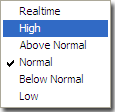 of particular applications
The program even enables you to change options which standard controls don't provide (for example, you can remove windows from the taskbar or change individual settings, such as window's icon and title). What's more, the tool supports multi-monitor systems allowing you automatically place particular windows to required monitor and specify window dimensions as per cent values of current monitor's resolution.
Not only Actual Window Guard serves well to facilitate your work with other applications but the program itself is very easy-to-use. The interface is made to be intuitive and friendly, so that you can get accustomed to it right away and quickly make needed adjustments. It's also handy that the tool offers functions for specified types of windows and has features applicable to all types at a time. With Actual Window Guard, it won't take much time to create and manage a system of rules for optimizing each and every detail of your workspace related to windows.
The rules can be applied to windows of almost any types of applications, including x64 ones. Moreover, at the moment Actual Window Guard is the only program of that kind, allowing you to manage command prompt (a.k.a. console/CMD/DOS) windows.
This utility is the final step to optimize your everyday Windows® experience and make it far more comfortable!

|
 |
What Users Say
| " I’m using Actual Window Guard on a MacBookPro running MacOS 10.4.11. I have Parallels Desktop 3.0 for Mac installed on it which lets me create a Windows XP virtual machine. Within that VM Parallels provides XP drivers (Parallels Tools) for display, other hardware, etc. I have a second LCD monitor connected to the MacBook and, unfortunately, the Parallels display driver only supports one large desktop that spans both monitors (different sizes) so display management with Parallels is non-existent. There is no control over which XP applications open on which monitor or their window sizes (unlike Dell Latitude NVidia drivers which offer support for different displays and applications). Actual Window Guard makes it much easier to manage XP applications as to where their windows are positioned when they are launched instead of the default center between both screens. " |
| Bob G. - Sunnyvale, California |
| "Actual Window Guard Review at Geek News Central
"Actual Window Guard allowes me to control what is happening on my desktop."" |
| Todd Cochrane - Geek News Central |
| ""Thank you for making a singularly useful product in your Actual Window Guard. For many moons I have been searching for a way to control the window positioning behaviour of my everyday applications. After frustrating myself time and again with useless registry hacks, application launchers, and macro recorders, I found your tool. In ten minutes, I've configured my applicatons and am using them with easy."" |
| Steve Mirsky |
| Read more testimonials... |
|
|
|
