
|
|
Actual Window Manager Log Window
The Actual Window Manager Log window displays the contents of the log file handled by the Windows Monitoring Log tool.
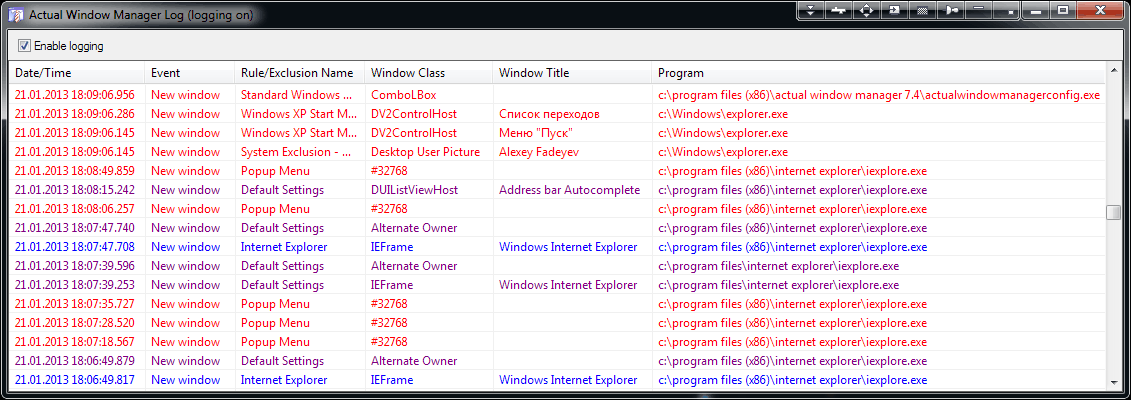
Enable logging check box - works the same as this option but lets you toggle the logging state on-the-fly.
There is a list box displaying the list of window events currently stored in the log file. Here is the color legend used to display items:
| purple font color | default settings have been applied to a window |
| blue font color | certain specific settings have been applied to a window |
| red font color | window has been excluded due to a certain exclusion |
| white background | the New window event happens |
| light green background | the Caption changed event happens |
| light yellow background | the VD activated event happens |
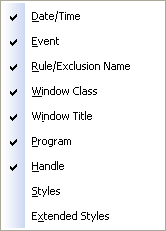
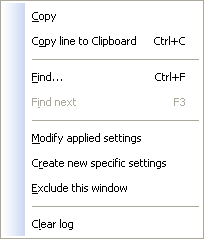
Copy command - copy to Clipboard clicked item's value from the column where the click is happened
Copy line to Clipboard command - similar to previous but copies the whole line instead of a single value
Find... command - find the first item in the specified direction (up/down) containing the specified text
Find Next command - find next items in the specified direction (up/down) that contain the specified text
Modify applied settings,
Create new specific settings,
Exclude this window - these commands are identical to those ones available via Manage Window Settings context menu
Clear log command - clear the log contents
You can close this window either by clicking its standard Close title button or via the Hide log window command of Control Center's context menu.
