
|
|
Aero Snap
Available in: Actual Window Manager, Actual Multiple Monitors, Actual Title Buttons, Actual Window Menu.
The Aero Snap action provides the fast and convenient allocation of windows within desktop for Windows XP/Vista by emulating the feature presented in Windows 7 - the Aero Snap mode. When enabled, the Aero Snap action provides various automatic effects while a window is being dragged or sized with the mouse.
Dragging a Window
The following effects are available when dragging a window:
auto-maximize a window being dragged when the mouse pointer touches the top edge of desktop;
auto-restore a maximized window when you are about to drag it. In other words, now you don't need to restore a maximized window first to drag it somewhere; instead, you can simply begin dragging it as any normal window - it will be restored automatically (and then you can maximize it back using the above-mentioned Aero Snap auto-maximizing);
auto-span the left/right half of desktop with a window being dragged when the mouse pointer touches the left/right edge of desktop.
Note
The spanned window will be restored to its normal size when you begin to drag it again.auto-span the top-left/top-right/bottom-left/bottom-right quarter of desktop with a window being dragged when the mouse pointer touches the corresponding desktop corner (Windows 10 snapping style).
Note
The spanned window will be restored to its normal size when you begin to drag it again.
In the "auto-span" cases mentioned above, after you have snapped a window to an edge/corner, the Windows 10-style Snap Assist window may appear when the remained screen area can be unambigiously filled with another window:
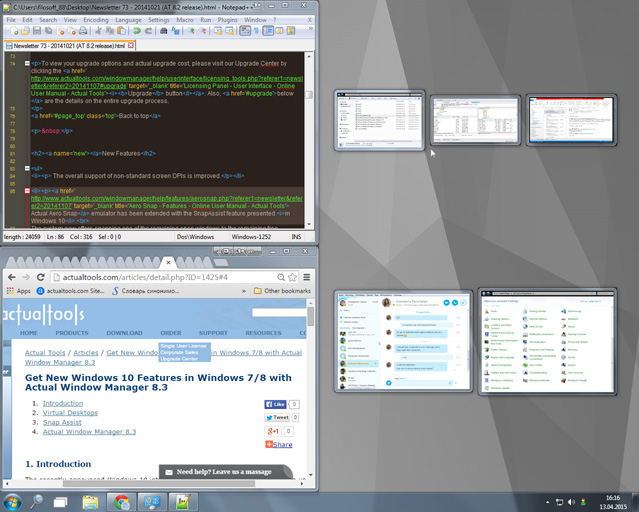
Snap Assist window on the right displays other windows available for snapping
It allows you to select a window to snap it to another edge or to a remained corner. This speeds up the allocation of windows for some frequently happened situations (e.g. when you need to place two windows side-by-side).
Sizing a Window
The following effects are available when sizing a window:
auto-maximize a window just vertically while sizing it either upwards or downwards and the mouse pointer touches the top/bottom edge of desktop;
auto-maximize a window just horizontally while sizing it either leftwards or rightwards and the mouse pointer touches the left/right edge of desktop.
Hint While dragging a window, you can temporarily disable this kind of snapping by pressing and holding the defined key combination; release it to activate the snapping back.
Related actions: Align, Change Run Mode, Snap, Stretch.
